

Three new directory actions caught my eye while I was going through my morning routine of checking changes to Microsoft 365 admin roles on msadminroles.com. They where:
- conditionalAccessPolicyPlans/basic/update
- conditionalAccessPolicyPlans/create
- and conditionalAccessPolicyPlans/delete
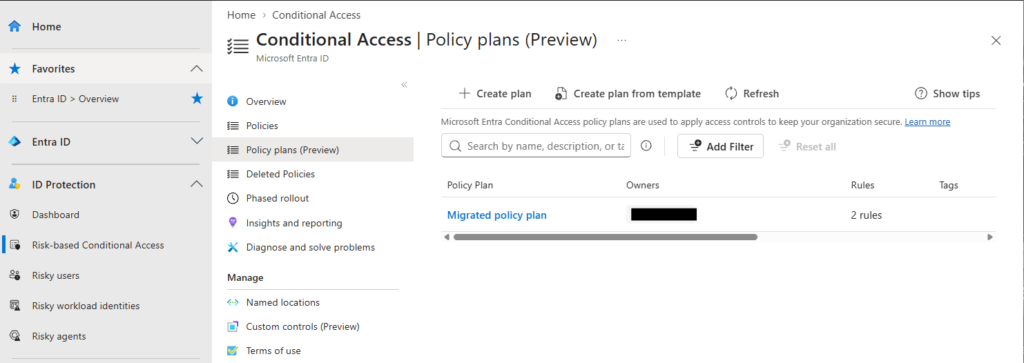
Their names point to a new Conditional Access object type, called “Policy plans”, but Microsoft have not announced a feature called policy plans, so I followed the permission trail into the Entra portal to see what those actions might support. Keep this is mind when looking for this yourself. Whatever the state, it looks to be in some form of Public Preview, as I can access this over all of the public tenants I have tested.
There, I found a Migrate to Conditional Access Policy plans preview that lets you combine selected policies into a plan. The migration flow says conditions shared by the selected policies move into a shared section and each original policy becomes a separate rule.
Updated 26/10/2026: 8 days after this original post, Microsoft have now published official documentation on Policy Plans.
What I found inside a plan
Naturally, I did some digging around on this. Overall, the purpose of Policy Plans is to group the related Conditional Access requirements around a common Security intent. For example, if you have multiple Conditional Access policies with the security intent to enforce MFA, you can group these up into a Plan, where each policy is represented as a “rule”. This is generally a cleaner approach to managing a larger number of anything, so it’s nice to see this for Conditional Access policies.
As well as this, Plans introduce the concept of shared or inherited properties, where you can define a shared item like an identity, resource or condition, which will be inherited by all rules beneath it.
So, when you open a plan, the plan overview shows its name, owner and when it was created. My test simply grouped two similar MFA policies as separate Off rules, and the client app type has been configured once as a shared condition, which makes sense as this was one of the consistent properties on each policy.
Within a plan, you can search and filter the rules, view sign-in columns or open a rule to inspect its settings. I also found controls to add, edit, move, duplicate or delete rules, plus an Edit all rules action that allows you to turn On or Off all rules at once.
Creating a new Policy plan
It seems very simple to create a policy plan. You can either create a plan from your existing live Conditional Access policies, or create a plan from a selection of the existing Conditional Access templates, or completely from scratch. I don’t see creating them from templates as hugely beneficial. I imagine that most users of Policy Plans will be migrating a large number of existing policies into more manageable Plan, where each policy can be treated as simply a rule, which makes more sense to me.
To create a new Plan from scratch, follow the below steps:
- Simply open the Policy Plans blade and click Create Plan.
- Give your plan an name and define an “Owner”.
- Define the Shared Identities, Resources and Conditions. Shared items will be inherited by all rules by default.
- Create a rule, as you would any Conditional Access policy.
- The click Review & Create.
Migrate existing policies to a Policy Plan
The coolest feature of Policy Plans is the ability to migrate multiple Conditional Access policy into a single policy plan as individual rules. To do this, from the Policies blade in Conditional Access, click the Get started button under the Policy Plans banner, then select multiple of your policies that share the same security intent and click “Merge into plan” and “Create policy plan“.
It’s a simple as that it seems. The rules within the Plan will be created in the Off state, so you will still need to manage that migration process. Also, there are no indicators I can see from the Policies list which highlights policies with similar security intent, that would be a useful addition to guide admins.
Wrapping up
In all, this is a really cool feature. However, at the time of writing this I cannot see it has been announced and looks to be in some form of public preview, so I won’t go to far into a deep dive just yet. It just seems that for some reason Microsoft have released this into the wild for Production tenants without much consideration for the pesky people like me who will find it and poke around at it.
Keep an eye out on official channels for an announcement before you start using Conditional Access Policy Plans.
