

Back in November 2025, Microsoft announced via an update to the Microsoft 365 roadmap that cross-tenant group synchronisation will start to roll out in April 2026, enabling organisations to synchronise Group objects in Microsoft Entra ID between Microsoft 365 tenants.
Just a few days ago, I noticed changes to the cross-tenant sync documentation appeared on GitHub to suggest that maybe, some changes were already happening well in advance of the April rollout target. This led me to investigate if I could get this functionality working…
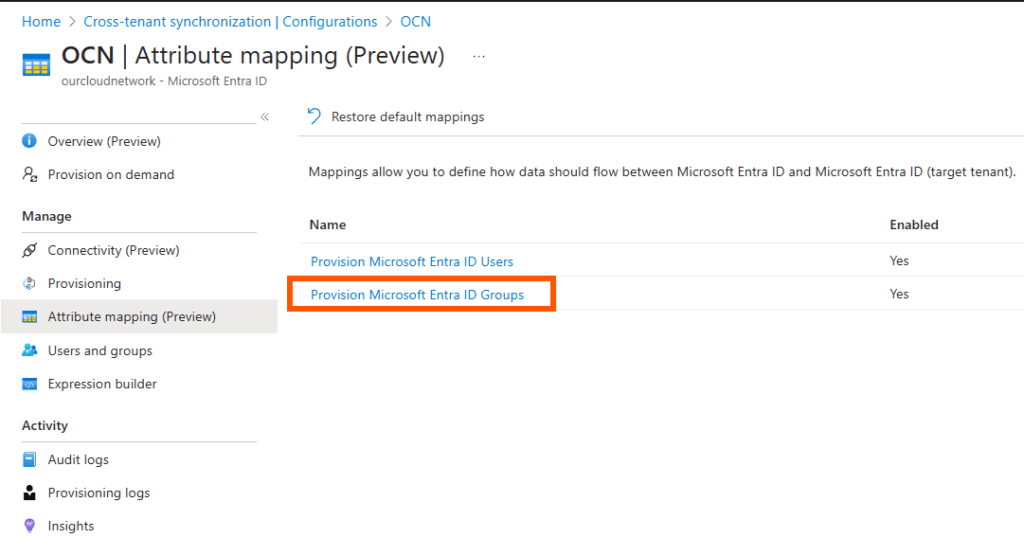
The key to Cross-Tenant sync is the attribute mapping, this is where synchronisation rules are created which map objects and their properties between the source and destination tenants. Below is a screen grab post-configuration, where you can see a separate mapping has been created which provisions Microsoft Entra ID Groups. Otherwise, if you are reading this blog before April 2026, you will likely only see the rule to provision Microsoft Entra ID Users.
I am going to use the Microsoft Graph Explorer tool as part of this investigation to configure group provisioning as it will quickly allow me to view responses to the Graph API in full and send change requests. The Microsoft Graph Explorer tool is incredibly useful, I have used it in many scenarios, such as when I identified you could Find and Restore Deleted Cross-Tenant Access Policies.
The first job was to run a GET request to obtain the schema for the attribute mapping. I managed to get this using the following request:
GET https://graph.microsoft.com/beta/servicePrincipals/e236cebf-c0d4-44f6-b91e-9ef4f29f8c5a/synchronization/jobs/Azure2Azure.235e5e63c104417e9ed6e96d9a456a9d.ffde27fe-a9f9-4101-bf5a-c25c0c1af049/schema
The schema returned includes items such as the Synchronisation rules and Directories within the Cross-tenant Sync. Specifically, object mappings are included within the rules which determine which object types can be synchronised. By default, the group object type is returned within the response, but it is disabled and it is also missing essential attributes. To modify the schema, you should copy the response and paste it into an editor of your choice, you will need to modify it and send it back with a PUT request.
Here is an example of an updated version of that object type that is enabled and also includes the missing essential attributes, which are mailEnabled & securityEnabled.
{
                    "enabled": true,
                    "flowTypes": "Add,Update,Delete",
                    "name": "Provision Microsoft Entra ID Groups",
                    "scope": null,
                    "sourceObjectName": "Group",
                    "targetObjectName": "Group",
                    "attributeMappings": [
                        {
                            "defaultValue": null,
                            "exportMissingReferences": false,
                            "flowBehavior": "FlowWhenChanged",
                            "flowType": "Always",
                            "matchingPriority": 1,
                            "targetAttributeName": "displayName",
                            "source": {
                                "expression": "[displayName]",
                                "name": "displayName",
                                "type": "Attribute",
                                "parameters": []
                            }
                        },
                        {
                            "defaultValue": null,
                            "exportMissingReferences": false,
                            "flowBehavior": "FlowWhenChanged",
                            "flowType": "Always",
                            "matchingPriority": 0,
                            "targetAttributeName": "description",
                            "source": {
                                "expression": "[description]",
                                "name": "description",
                                "type": "Attribute",
                                "parameters": []
                            }
                        },
                        {
                            "defaultValue": null,
                            "exportMissingReferences": false,
                            "flowBehavior": "FlowWhenChanged",
                            "flowType": "Always",
                            "matchingPriority": 0,
                            "targetAttributeName": "mailNickname",
                            "source": {
                                "expression": "[mailNickname]",
                                "name": "mailNickname",
                                "type": "Attribute",
                                "parameters": []
                            }
                        },
                        {
                            "defaultValue": null,
                            "exportMissingReferences": false,
                            "flowBehavior": "FlowWhenChanged",
                            "flowType": "Always",
                            "matchingPriority": 0,
                            "targetAttributeName": "mailEnabled",
                            "source": {
                                "expression": "[mailEnabled]",
                                "name": "mailEnabled",
                                "type": "Attribute",
                                "parameters": []
                            }
                        },
                        {
                            "defaultValue": null,
                            "exportMissingReferences": false,
                            "flowBehavior": "FlowWhenChanged",
                            "flowType": "Always",
                            "matchingPriority": 0,
                            "targetAttributeName": "securityEnabled",
                            "source": {
                                "expression": "[securityEnabled]",
                                "name": "securityEnabled",
                                "type": "Attribute",
                                "parameters": []
                            }
                        }
                    ],
                    "metadata": [
                        {
                            "key": "IsCustomerDefined",
                            "value": "true"
                        },
                        {
                            "key": "DisableMonitoringForChanges",
                            "value": "false"
                        },
                        {
                            "key": "Disposition",
                            "value": "\"Normal\""
                        },
                        {
                            "key": "ExcludeFromReporting",
                            "value": "false"
                        },
                        {
                            "key": "EscrowBehavior",
                            "value": "\"Default\""
                        },
                        {
                            "key": "Unsynchronized",
                            "value": "false"
                        },
                        {
                            "key": "OriginalJoiningProperty",
                            "value": "displayName"
                        }
                    ]
                }
These attributes also need to be added to the directories array within the JSON, like so:
{
                            "anchor": false,
                            "caseExact": false,
                            "defaultValue": null,
                            "flowNullValues": false,
                            "multivalued": false,
                            "mutability": "ReadWrite",
                            "name": "mailNickname",
                            "required": false,
                            "type": "String",
                            "apiExpressions": [],
                            "metadata": [],
                            "referencedObjects": []
                        },
                        {
                            "anchor": false,
                            "caseExact": false,
                            "defaultValue": null,
                            "flowNullValues": false,
                            "multivalued": false,
                            "mutability": "ReadWrite",
                            "name": "mailEnabled",
                            "required": true,
                            "type": "Boolean",
                            "apiExpressions": [],
                            "metadata": [],
                            "referencedObjects": []
                        }
Here you can see that I have successfully added and enabled the group object sync ability to the cross-tenant sync schema.

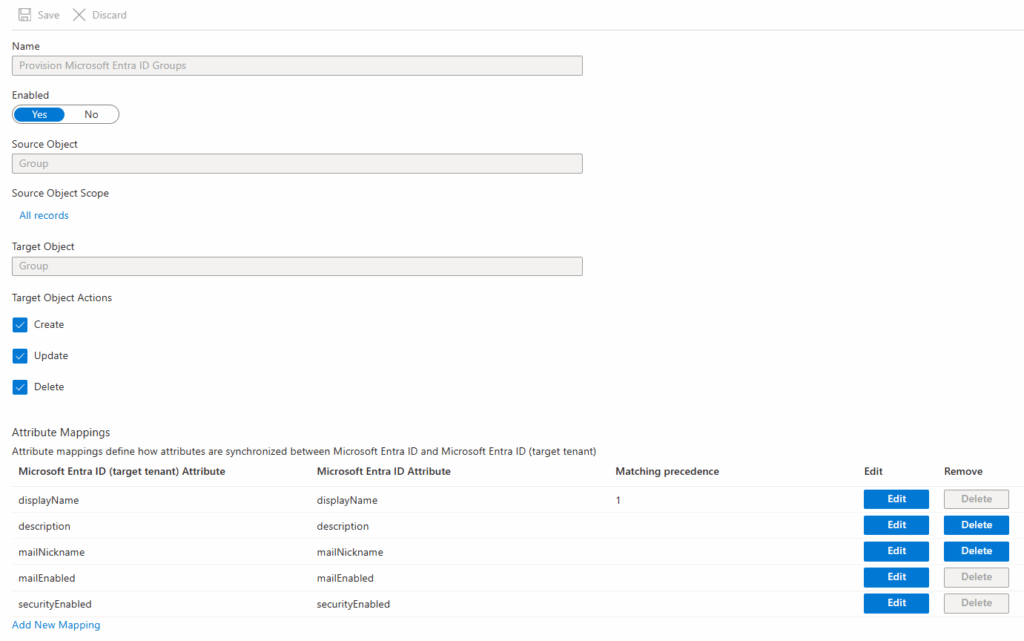
Now that the schema has been updated with the additional information for groups, the attribute mapping for groups will appear in the Microsoft Entra admin center, where you can make further modifications to the group sync configuration.
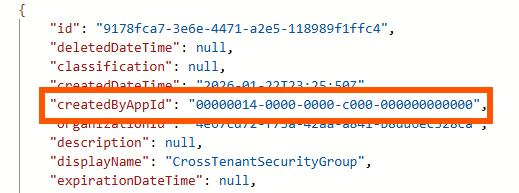
Once a group has been synchronised to the destination tenant, which can be done by assigning the group to the cross-tenant sync, the only factor that identifies that the group has been created, not by a user, but by the cross-tenant sync, is that the createdByAppId property shows as “00000014-0000-0000-c000-000000000000”. This is the Microsoft.Azure.SyncFabric, whose purpose it is to facilitate data and identity synchronisation within Azure.
As of today, I haven’t attempted to map the members of the group via the attribute mappings, but that is something I shall look into in an upcoming article.

Good Job. I’m trying to find out why “groups synchronizing” not working. You gave me the answer – thank you!
Great blog. I just tried this and it was nice to have groups sync. The only thing I wish I could figure out is if the users in those groups would sync as well. In my case, the groups did sync but the user assignments to those groups did not. The users synced but just not within the group membership. So, still back to using automation to reassign the users back to these groups in the target tenant.
Hi Kris, I enabled group sync via the Graph API update for the cross tenant setting too. But since the users are not within the group membership it is not solving my purpose. What kind of automation are you using to reassign the users to the groups in target tenant ? Are you doing any Graph API update in the target tenant ?
Hi Daniel,
I enabled group sync (preview) in external identities, but the schema does not contain disabled group sync. I am struggling to enable the group sync (ie to show the attribute mappings). Does anyone have the same issie?