

I’m not surprised Microsoft has given “Password” its own page in the Entra Authentication methods policy. If your users sign in with passkeys every day, they may only think about their password when an older app asks for it, or if something goes wrong with the Passwordless login flow. Microsoft’s first move here is to let them change it without knowing the old one. In Message Centre notice MC1437671, Microsoft said it expected the Worldwide and GCC rollout to finish by the end of November 2026.
Go to Entra ID > Authentication methods > Policies > Password and you’ll see All users under Enable and target. The page says the method is always enabled. The only setting you can change right now is under Configure: Allow password change after secure sign-in. It’s off by default, and you can’t scope it to a pilot group
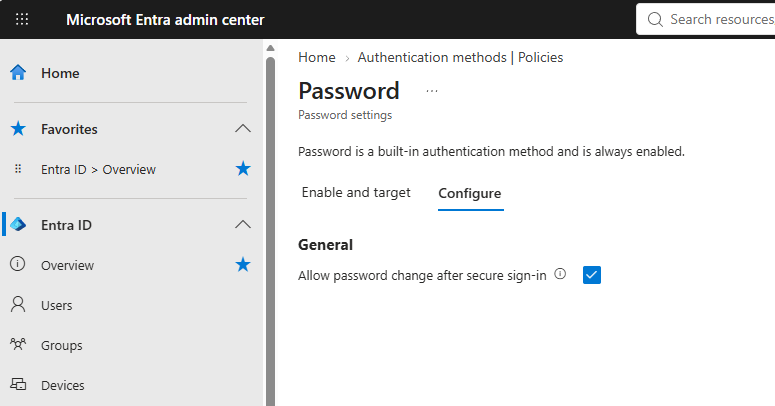
Say someone uses a passkey for Microsoft 365 but has forgotten the password they need for an older app. With the setting on, they can sign in with their passkey and set a new password in My Sign-Ins > Security info without enrolling in self-service password reset (SSPR). They will, of course, still need a Microsoft Entra ID P1 or P2 licence.
Where Microsoft might drop the password prompt
Microsoft could eventually take the password option out of Entra sign-in altogether for users who’ve registered a passkey. But in the real world, I’d expect it to start with selected sign-in experiences instead. The Windows passwordless experience already hides the option in some Windows sign-ins without removing the password from the account. Deleting the password itself seems least likely for existing hybrid users whose on-premises apps still rely on it, so I would expect any changes to be cloud-only identities regardless.
Microsoft hasn’t announced any of those options for this policy. For now, you can require phishing-resistant MFA for selected apps with Conditional Access, but users can still enter a password at initial sign-in.
