

Application policies are a fantastic way to make sure your enterprise applications and app registrations meet your security requirements, but it’s easy to set them up once and leave them alone. When I wrote about which application policies to enable, the choices covered credentials and identifier URIs, but now there are four more settings to review, including ones that control which types of accounts an app registration can accept.
What new policies have been added
Under Entra ID > Enterprise apps > Application policies, there are two new sections of policies to configure. The sign-in audience restrictions govern which audiences you can select when you create an app registration or change its audience later. Then the service principal credential restrictions addresses whether you can add a credential directly to the local enterprise application object. Here are the newly added policies:
- Block new applications with multitenant sign in audience
- Block new applications with consumer account sign in audience
- Block addition of credentials to foreign service principals.
- Block addition of credentials to service principals in favor of application-based credentials
Recommended settings for new policies
In you workforce tenant (or the tenant your business operates from, You should turn on Block consumer account applications unless you have an approved app that needs to accept personal Microsoft accounts, such as Outlook.com accounts, but there really will be very limited scenarios where this needs to be left off, so you a pretty safe to just enable this. You should also turn on Block multitenant applications where you expect apps registered in the tenant to stay single-tenant, with exceptions for apps you deliberately publish to customers or partners. If you didn’t realise, a single-tenant registration can still serve guests invited into your directory, so you don’t have to make an internal app multitenant just to give a guest access if any B2B relationships you have with other organisations. If you’re concerned about users consenting to vendor apps published in other tenants, you should review your consent settings separately.
Of the two credential controls, you should start with enabling Block foreign service principal credentials to prevent credential additions to your local instance of an app registered in another tenant, unless an approved integration specifically needs one. I would also aim to turn on Block service principal credentials more broadly once you’ve checked how your own workloads authenticate. You be a little more prescriptive with this policy though and just block password credentials as a critical first step, before expanding out to all credentials, as my recommendation.
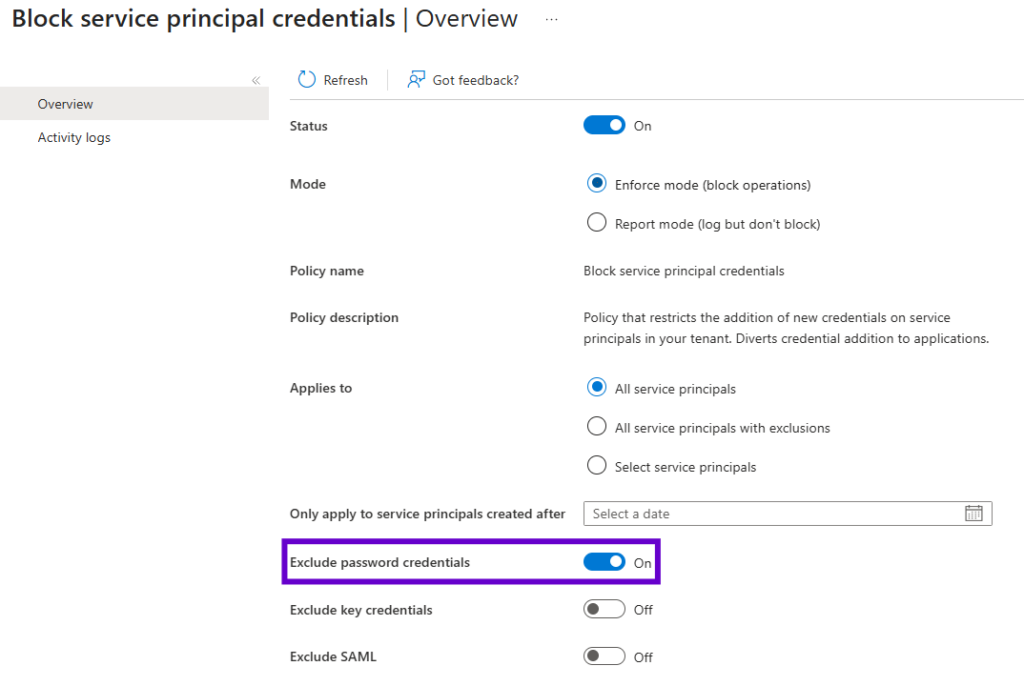
Considerations for enabling application policy and assessing impact
Microsoft documents that application management policies block non-compliant writes rather than token issuance, so you should retrospectively check if any existing applications would fall in scope of the policies you have enabled and manually remediate them if you can. Otherwise, at the time credential rotation is required, the rotation may fail which could impact a line of business service. You can use the Usage & insights | Application credential activity report to support this investigation.
For the audience policies, if you have any apps which are now in a “non-compliant” state since defining your policy, try replacing the app with a single-tenant registration which will block multi-tenant use and personal account use, so you can confirm that your usual app setup still works and that Entra rejects the change you meant to prevent. If you need an exception, you can add the application as an exception to the application policy, but take this seriously and set deadlines to enforce on the app owner.
Wrapping up
These are some great new policy additions to help you regain control of any poor configuration decisions make to your applications. But, before you enforce these new policy, you should sanity check what the impact could be for any of your critical line of business applications.
