

Microsoft have decided that standard Microsoft 365 users will soon be able to create Agent blueprints in your Entra tenant unless you turn off the new permission. In MC1506733, published on 13 October, Microsoft have scheduled the change to start on 4 November 2026, with worldwide rollout expected to finish by late November.
An agent identity blueprint is the template and authentication foundation for Agent Identities, so this change just expands who can create blueprints in your directory. Creating a blueprint does not automatically grant access to company data, because resource permissions and consent remain separate requirements, that must be granted by someone with the necessary privileged access.
Before this change happens, you should restrict creation to specific, approved users rather than leave it available to every employee. Self-service is useful, but I would want a named sponsor and an agreed purpose before giving someone permission to create blueprints, otherwise your environment will become messy.
Restrict creation to approved users
You protect yourself from this change, first, sign in to the Microsoft Entra admin centre using an authorised Global Administrator account and open Entra ID > Users > User settings. Under Default user role permissions, set Users can create agent blueprints to No and save the change. You can save this preference now, but it only takes effect during rollout.
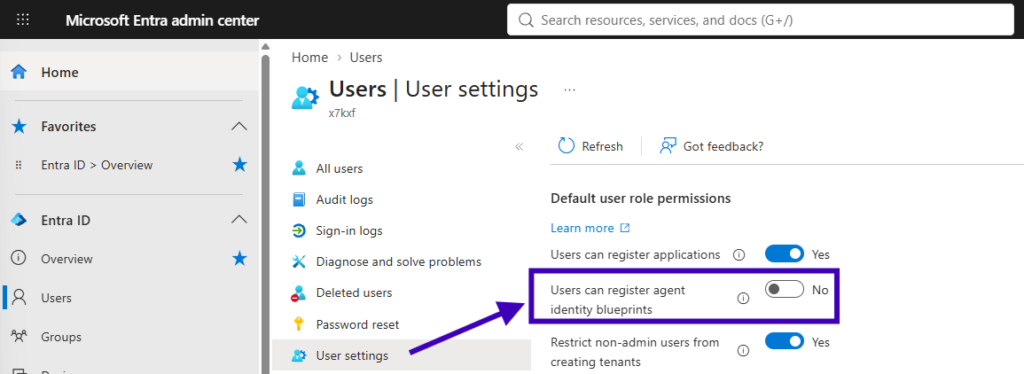
Next, sign in as at least a Privileged Role Administrator, open Entra ID > Roles & admins, and select Agent ID Developer. Choose Add assignments, select your approved users, and select Add, following the PIM workflow instead if your tenant presents that experience.
The Agent ID Developer role allows blueprint creation without granting broader administrator access. Supported administrators retain their creation rights, so review those assignments too. For reference, the Agent ID Developer role can perform the following directory actions:
- AgentIdentityBlueprint.AddRemoveCreds.All
- AgentIdentityBlueprint.Create
- AgentIdentityBlueprint.DeleteRestore.All
- AgentIdentityBlueprint.Read.All
- AgentIdentityBlueprint.ReadWrite.All
- Application.Read.All
- ServicePrincipalEndpoint.Read.All
This setting is independent of Users can register applications, and it does not remove existing blueprints or block identity creation from existing blueprints. Once rollout reaches your tenant, test with an approved user and an unassigned user who has no creation-capable role to confirm the restriction works.
