

If your organisation have Microsoft 365 E5 or E7 licenses, you can now use Security Copilot without buying a separate capacity plan. Thankfully, Microsoft provisions this automatically with a shared pool of compute that your agents and defenders can consume. So, as an admin, one of the first jobs you need to do is implement some access control around this.
This change was announced in MC1478465, but has been well known for a while and seems like Microsoft have finalised the rollout now. If you haven’t seen this in your tenant yet, this entitlement will cover core chat, promptbooks and agent scenarios across Defender, Entra, Intune Purview and the Security Copilot portal. It also includes tools for building custom agents and integrations.
Your monthly SCU allowance
A Security Compute Unit (SCU) measures the compute used by Security Copilot. Microsoft allocates 400 SCUs per month for every 1,000 paid E5 or E7 user licences, which works out at 0.4 SCU per licence. The allowance scales for tenants with fewer than 1,000 licences and stops growing at 10,000 SCUs. Unused units expire at the monthly reset.
| Paid E5 or E7 licences | Included SCUs per month |
|---|---|
| 100 | 40 |
| 400 | 160 |
| 1,000 | 400 |
| 4,000 | 1,600 |
| 10,000 | 4,000 |
| 25,000 or more | 10,000 |
Defender investigations, Entra queries and Purview agents all draw from the tenant allowance.
What uses the allowance
Microsoft’s capacity documentation gives three worked examples:
- Run a prompt: 3.0 SCUs used
- Summarise an incident: 0.5 SCUs used
- Run a promptbook: 3.7 SCUs used
These are billing examples rather than a fixed rate card. At those sample rates, the 40 SCUs supplied with 100 licences would cover 80 incident summaries, but only about ten promptbook runs, if nothing else used the capacity. An agent running automatically against every matching event is harder to budget than a manual prompt.
Microsoft excludes Sentinel data lake compute and storage, non-agentic Purview Data Security Investigations, Azure Logic Apps usage and partner agent licence fees. Some agents also depend on products outside E5 or E7, so a complete workflow may still cost money.
Prerequisites for access
Once Microsoft have notified your tenant that it is eligible, provisioning is automatic. Microsoft creates the default workspace and capacity, so you do not need an Azure subscription or manual SCU deployment. You can then confirm enablement is done through the Microsoft 365 admin centre notification or an in-product banner.
A user will still needs the Security Copilot owner or contributor role and they also need the licence and role required to read the underlying service data, such as a Defender XDR role or Microsoft Sentinel Reader. Just having the Copilot access by itself grants no access to security data, and it does not bypass existing data permissions, as with all Copilot deployments, your existing permissions are respected.
Limit Security Copilot to selected users
Open the Security Copilot portal and go to Role assignment. Some older tenants may still have the Everyone group assigned as a contributor, so you should remove it if present. New instances use Recommended Microsoft Security roles, which gives existing security role holders contributor access.
Create a role-assignable security group for approved users of Security Copilot, then add it as part of Copilot contributors. Then, review owner access separately because several Entra, Intune and Purview administrative roles inherit it by default. Security Copilot requires at least two owners. And obviously do not assign Security Administrator just to provide Copilot access. Security Copilot has its own roles.
Below is a screenshot of my Security Copilot Role assignments after unselecting the Recommended Security Roles during setup:
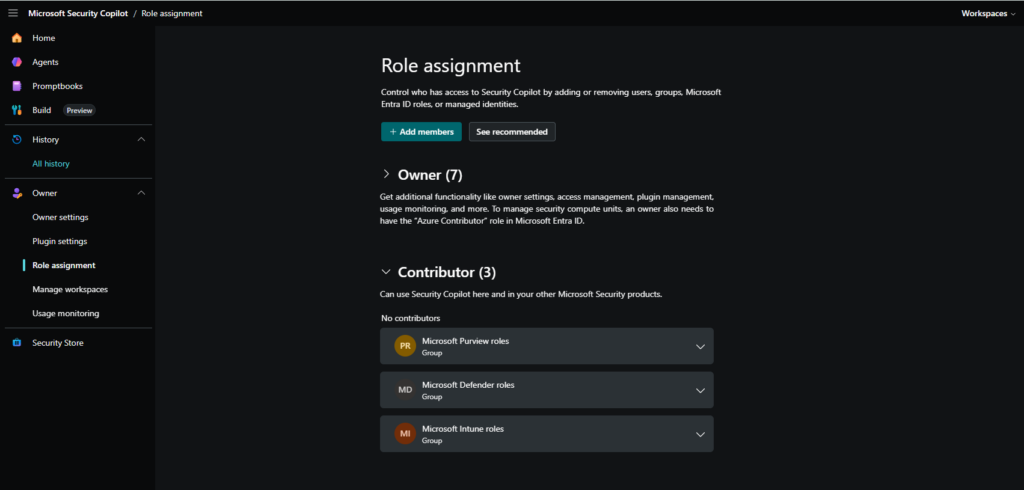
By creating a single group and managing contributor right, it will give you just one membership list to review when somebody changes role or leaves the security team. Otherwise, it will become increasingly difficult to manage unless you have endless pockets of money.
Monitor usage and manage spend
Copilot owners can open Owner settings > Usage monitoring to inspect consumption. The dashboard retains up to 90 days of usage and filters by user, plugin, category and manual or automated action. After you first week of usage, export the data and look for agents generating many small sessions as well as occasional expensive promptbooks.
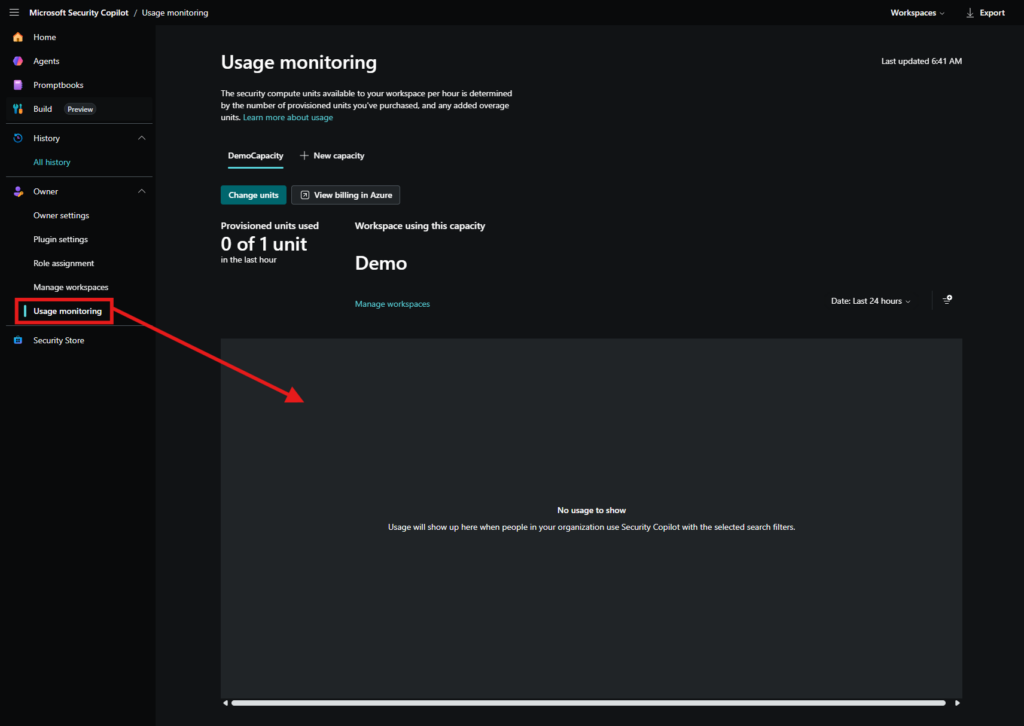
The included default capacity cannot be edited and does not incur an hourly charge. But, you should still pause an agent if its output does not justify its consumption, and keep paid partner agents or other Logic Apps out of the this pilot unless you have approved their separate costs.
Microsoft do says that they will eventually throttle tenants that exhaust their allowance. During setup, they also offer optional overage at $6 USD per SCU and will provide 30 days’ notice before that option arrives. With this overage, you should still set a finite limit.
