

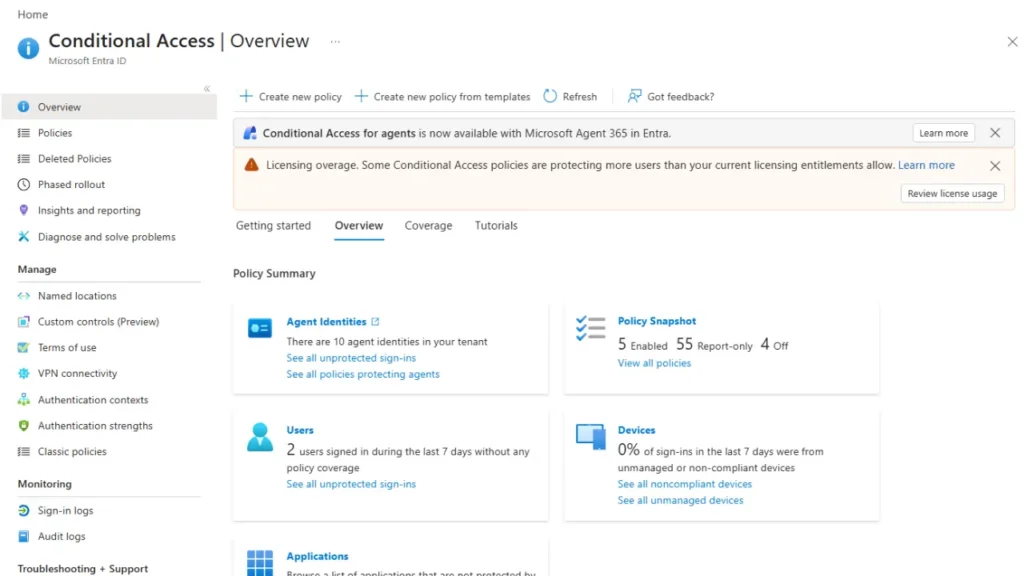
Over recent weeks, a new warning has appeared on the Conditional Access overview page in my (and many of my customers) Microsoft 365 tenant’s. It states “Licensing overage. Some Conditional Access policies are protecting more users than your current licensing entitlements allow.”
That is unusually direct language for Microsoft Entra licensing. It does not say that Microsoft will disable policies, issue a bill or begin a licence audit. However, it shows that Microsoft can compare Conditional Access usage with the licences held by a tenant and put the mismatch in front of an administrator. I think this is the clearest sign yet that Microsoft is starting to push customers towards compliance using its own usage data.
Just a warning, not yet enforcement
Let’s not get confused here. Microsoft could already see your utilisation and have already issued “out of the blue” bills to customers in the past who are purposefully abusing their Entra license entitlements. That’s not what I am saying will happen to you if you see this message, but be mindful if you are a large organisation.
Now, Conditional Access requires Microsoft Entra ID P1, while risk-based Conditional Access requires P2. Microsoft’s current documentation also states that expired licences do not cause existing policies to be disabled or deleted automatically, so the banner should not be mistaken for a technical enforcement either (at least for right now).
The important change is visibility. The Entra licence usage insights measure unique users who had at least one Conditional Access policy evaluated during the reporting period. Microsoft can then compare that number with the tenant’s P1 and P2 entitlements and identify a usage spike above the licensed quantity.
Putting the result on the Conditional Access overview page makes it much harder to ignore than a report buried under Billing, a place usually owned by procurement and not the technical individuals managing the environment. It also gives Microsoft a data-backed route to prompt a licensing conversation before it considers anything more forceful, like the scenario I mentioned above…
Entra licensing is still complicated
Frustratingly, this who scenario matters because counting Entra licences is rarely as simple as counting user objects. In my earlier article about Microsoft’s One Person, One License philosophy, I covered Microsoft’s clarification that one employee does not need another Entra ID licence for separate internal identities, including accounts across tenants in the same cloud.
It’s helpful, but the licensing FAQ is informational rather than the agreement governing your use of the product. A usage report may also see two identities where your licensing position sees one person. Organisations therefore still need a defensible way to link administrative and day-to-day accounts back to the licensed employee behind them. In reality, you should have provisioning service managing this for you, but that’s another topic all together…
Microsoft have been building the licensing reporting needed to make these difference visible. Earlier this year, I covered the updates to the Entra licence usage insights blade. At that point, the blade exposed more entitlement information but lacked useful feature consumption metrics. Microsoft’s documentation now describes Conditional Access usage, risk-based usage, active and guest user views, six-month patterns and overage indicators.
What you should be doing about it
Don’t go buying licenses just from a banner alone. First, open Billing > Licences > License usage and compare the reported Conditional Access users with your P1 and P2 entitlement counts. Then check whether duplicate, guest or administrative identities explain the difference, and document how each secondary account maps to a licensed person.
There is no published evidence that Microsoft is about to switch on automatic Entra ID licence enforcement, but sometimes you just get that feeling. It’s probably due to the improved reporting, warning banners, huge amounts of cash Microsoft have spent on Copilot and their sales reps actively pushing customers to annual billing to support that cash flow. The warning does show that the data needed to identify overuse is reaching the places where administrators work. You should simply treat it as an early compliance notice. You this time to understand the gap now, before Microsoft decides that a warning is no longer enough.
