

If your organisation has spent time customising the sign-in experience in Microsoft Entra, you should pay attention to a change this just landed in the Message Center. Microsoft have announced that under message ID MC1435782 that they are retiring support for custom CSS positioning properties in company branding on 26 October 2026 and this now the second step towards removing custom CSS entirely.
As expected, this move forms part of the Secure Future Initiative (SFI), which is Microsoft’s ongoing effort to tighten identity security and improve phishing resistance across the platform. Let’s look at exactly what is changing, who it affects, and how you can prepare your tenant before the deadline.
Why Microsoft are making this change
Today, you can use custom CSS to control the layout, layering, and sizing of elements on your Entra ID sign-in pages. That flexibility is exactly the problem. The same properties that let you reposition a logo or overlay a banner can just as easily be abused to build a deceptive sign-in page that misleads users, and that is a gift to anyone running a phishing campaign. For example, here is me completely ruining my Entra sign-in page, but, it is clear how this could be abused.
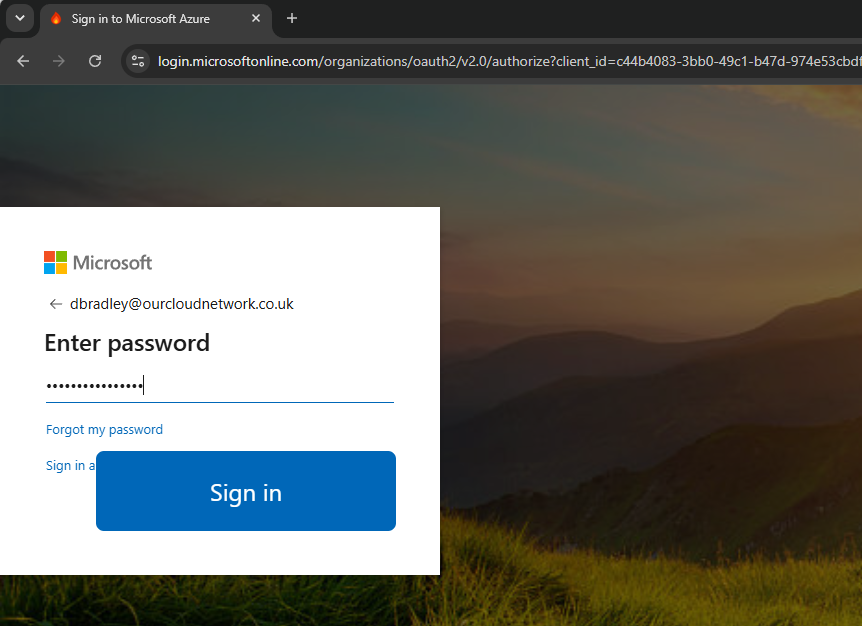
By deprecating these positioning properties, Microsoft is forcing a consistent and predictable layout across every tenant. The idea is that a standardised sign-in prompt becomes far easier for your users to recognise and trust, which makes a convincing fake much harder to construct. I am not surprised to see this happen, and I would expect the rest of the custom CSS feature to follow in due course. Microsoft has confirmed it will share further guidance and recommended migration paths before that final retirement arrives.
The positioning properties being retired
If you rely on custom CSS in your company branding, you need to audit your stylesheet for the following properties, because they will stop functioning on 26 October 2026:
position(includingtop,right,bottom,left, andz-index)margin(includingmargin-top,margin-bottom,margin-left, andmargin-right)transformtranslateopacityoverflowfilterpointer-eventsclip-pathmix-blend-mode
There is an important catch here. Microsoft offers no migration path or replacement for any of these properties. When the retirement takes effect, your branding elements such as logos, images, and text will remain visible, but they will revert to their default placement and appearance. If your current design leans heavily on positioning, expect it to look noticeably different afterwards.
Working out whether you are affected
This change only affects organisations that currently manage and use custom CSS positioning properties in Entra ID company branding, but the eligibility rules are worth understanding carefully.
If you created a new tenant after 5 January 2026, you can stop reading now, because custom CSS is not available to you for company branding in the first place. If your tenant predates that date but you do not already use the affected properties, you are also out of luck going forward. Microsoft blocked non-users from configuring these properties on 21 July 2026, so there is no opportunity to start relying on them now. Finally, Microsoft Entra External ID tenants are not impacted by this change at all.
Why this matters for CIPP and other management tools
This is where the change becomes interesting. Several third-party security and management platforms have leaned on custom CSS to deliver functionality that Entra ID never offered natively. A good example is CIPP (Cyberdrain Improved Partner Portal), which has used specially crafted custom CSS in company branding to surface phishing warnings on the sign-in page. In practice, a managed service provider could inject a banner or styling change that alerts a user the moment they land on a sign-in prompt that does not match their expected tenant.
Once these positioning properties disappear, that approach breaks. If you are an MSP or administrator who has built phishing alerting or any other visual cue on top of custom CSS, you need to accept that the option is on borrowed time and start planning a replacement now rather than scrambling after October.
What you need to do before October
So, if you do you rely on custom CSS for your Entra sign-in pages, the work needs to happen before 26 October 2026, and I would start sooner rather than later.
Begin by reviewing your current company branding configurations. The quickest way to check is to export your branding from Microsoft Graph Explorer using this endpoint:
https://graph.microsoft.com/v1.0/organization/%your-tenant-id%/branding/localizations
and pass the JSON output into Microsoft’s tenant branding inspector tool, which flags exactly which locales and properties are affected. From there, remove the retired positioning properties from your stylesheet and re-upload it on the Company Branding page in the Entra admin center.
To re-upload your CSS, perform a PUT request to this endpoint with the CSS in the body and the Content-Type : text/css header:
https://graph.microsoft.com/v1.0/organization/%your-tenant-id%/branding/localizations/0/customCSS
Whatever you do, validate the result in a test tenant before you touch production. The last thing you want is a broken or unprofessional sign-in page greeting your users the morning after Microsoft flips the switch.
