


Microsoft are tightening the screws on identity security again, now officially folding Passkeys (FIDO2) into their Entra ID “Registration Campaigns”. The move represents a significant escalation in Microsoft’s war against passwords, now actively and persistently “nudging” corporate users towards Passkeys. Registration Campaigns, for the uninformed, are Microsoft’s way of ensuring IT admins don’t have to manually nag users to secure their identities. Instead of manually emailing staff to update their security settings, likely only for them to be ignored, the campaign interrupts the login flow with a prompt. Users are given a choice, set up a more secure method now or “snooze” the request for a limited number of days before the upgrade becomes mandatory.
How to enable Passkey regisration campaigns
If you have never touched the registration campaign feature in Microsoft Entra for your organisation, you may find the feature is set to the “Microsoft managed” state. In this state, when Microsoft makes changes (like setting Passkeys as the default), your organisation will silently follow along, and your users will naturally begin to be prompted to register passkeys by default. There are, of course, some other prerequisites to this being default behaviour, including:
-
The Passkeys (FIDO2) authentication method being enabled (default).
-
Allowing self-service setup (default).
-
No AAGUID restrictions are configured (Target specific AAGUIDs is not selected).
-
The Registration Campaign state is set to Microsoft-managed (default).
-
You have at least one user enabled for both synced and device-bound passkeys.
I touched on these specifics in my previous blog article: Microsoft Entra Passkeys: Registration Campaign Delays Explained.
To check the status of your registration campaign settings, log in to the Entra admin centre, then expand Entra ID, click Authentication methods, then Registration campaign. Your page should look something like the one shown in the image below:
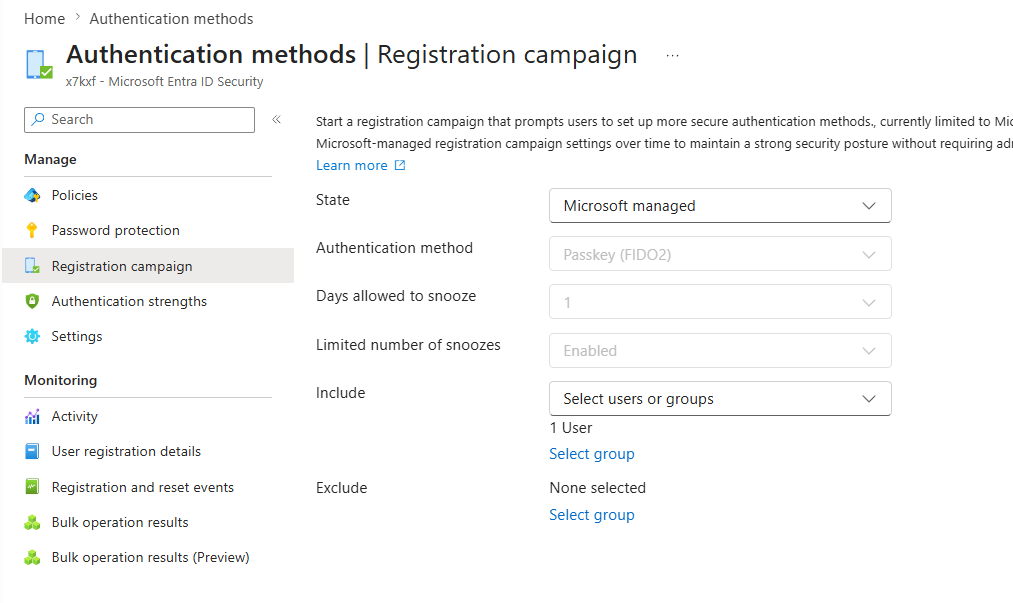
If “Passkey (FIDO2)” is not the default setting right now, here you have the chance to change it, but you should communicate the impact to your business first!
Why passkeys
The industry pivot to Passkeys isn’t just about convenience (yes… it is more convenient, even if your users say it isn’t), though being able to sign in with a thumbprint or Face ID is a significant experience win in my opinion. It’s about eliminating the “human element” of credential theft. Because Passkeys use public-key cryptography, there is no “secret” (like a password) stored on a server, written down on a notepad, or stored in a file for a hacker to steal in a breach. It is also superior security-wise to more traditional authentication methods like SMS or Microsoft Authenticator, as the ability to steal the credential is exponentially harder, it’s branded “phishing-resistant” for a reason.
