

Time is running out for Exchange Server 2019. Support is ending next month and organisations need to decide whether to commit to the new Subscription Edition (SE) or finally rid themselves of that Exchange Server. The answer requires careful navigation of costs, understanding dependencies on AD and assessing your team’s management capabilities. In this article, I will walk you through understanding Exchange SE, the complexities of Hybrid Exchange and Management, and show you one of my favourite user management solutions to make your life easier.
Page Contents
What is Exchange SE?
To be clear, Exchange SE is simply a change in how Exchange Server is serviced and licensed. While Exchange Server 2019 follows a Fixed Lifecycle Policy, with predictable mainstream and extended support end dates that you could plan around for years. On the contrary, Exchange Server SE is governed by the Modern Lifecycle Policy, which provides continuous support and servicing for a product, provided the customer stays current by accepting all updates and using the product in accordance with its licensing and servicing requirements.
From a technical perspective, the initial release of Exchange Server Subscription Edition is virtually identical to Exchange Server 2019 Cumulative Update 15. It contains no new features, requires no new Active Directory schema changes, and shares the same installation prerequisites. The main difference lies in the future development path. All new functionality, architectural improvements, and significant enhancements will be delivered exclusively through future updates to the Subscription Edition, leaving Exchange 2019 to receive only security and non-security fixes, but only until October 14, 2025. After this date, Microsoft will no longer release security updates for Exchange Server 2019, even for newly discovered vulnerabilities, leaving any servers still running this version exposed.
Licensing requirements for Exchange SE
To use Exchange Server Subscription Edition (SE), you must adopt a subscription-based licensing model, which is a significant shift from the perpetual licenses used in previous versions. Here are the requirements broken down:
- The base licensing of Exchange Server SE is the same as Exchange Server 2019. This means you still need the required Server Licenses and CALs. If you already have an Exchange licence for 2016/2019 (Server and CALs), you have usage rights for SE.
- An active subscription. This means either purchasing Software Assurance (for Exchange 2016/2019 or SE when available) or qualifying M365 licenses, including Microsoft 365 E3 or E5.
So, if you are running Exchange Server 2019 without Software Assurance right now, your licensing options are either to sync all users to Microsoft 365 (if not already using Entra Connect) and assign them a Microsoft 365 E3 license (£29.00 user/month RRP, or buy Software Assurance. Software Assurance costs can vary dramatically through different distributors, but making some assumptions:
- 312-03042 – MST-312-03042-3Y1P – Server Standard (Roughtly £450)
- 381-02267 – MST-381-02267-3Y1P – User CAL (Roughly £60)
Estimated cost Summary for 500 users over 3 years
Of course, most organisations may get a customised deal from their CSP or Microsoft, but based on the RRP, we can make some assumptions about the cost for licensing Exchange SE:
- Microsoft 365: £522,000, OR
- Software Assurance: £360,450
Some key points to factor in here are that running Exchange Server and legacy infrastructure requires paid people to run and maintain, over and above the required effort to manage mail in Microsoft 365. Also, the costs to obtain the Microsoft 365 licenses would feel wasted if not fully utilised. That being said, if you plan to migrate to Microsoft 365 within the next year, it would make sense to go down the Microsoft 365 licensing route.
Complexities and dependencies of Hybrid Exchange
Conveniently, you still get free licenses for qualified hybrid use of Exchange Server for recipient management only. But you will now need to purchase Software Assurance to ensure you receive server updates.
Even so, let’s focus on the “last Exchange server”, a scenario with which many of us are now familiar. You have migrated all of your mailboxes to Exchange Online and are reaping the benefits of the cloud, but you are left with one lone on-premises Exchange Server. The simple assumption is that you need it for recipient management in a hybrid identity setup; the poor assumption is that it is just a simple, lightweight management server that you can forget about… In reality, it is still a critical piece of infrastructure that requires maintenance.
To put things straight, it is still a full installation of Microsoft Exchange Server. Even though it isn’t (or shouldn’t be) processing mail flow or hosting mailboxes, it’s running the same code, has the same services and has the same vulnerabilities, even if you are no longer publishing it to the internet. So, it still needs to remain on an OS and ESU patching cycle, to adhere to the regulations you attest to each year and to keep you secure.
Furthermore, this Exchange Server is deeply woven into the fabric of your Active Directory. The entire reason it exists is to correctly write specific Exchange-related attributes (msExchHideFromAddressLists, proxyAddresses, etc) to your user, group, and contact objects (as well as send mail, ofcourse…). These attributes are then picked up by Entra Connect or Cloud Sync and synchronised to the cloud. The complex logic and validation that the Exchange Server does to ensure these properties are formatted correctly can not simply be replicated using ADSI Edit or a PowerShell script (Outside of the Exchange Management Tools). Microsoft do now support Cloud-based management of Exchange attributes for Remote Mailboxes in hybrid environments, but that is still in the preview phase.
IT Professionals and their PowerShell proficiency
A simple alternative to managing hybrid mail users after decommissioning your Exchange Server is to use the latest Exchange Management Tools with PowerShell. A key requirement, however, is that you’re comfortable using Windows PowerShell. While this might seem obvious, I’ve conducted my own “light” investigation into IT professionals’ general proficiency with PowerShell, which covers colleagues, customers and professionals I have interacted with over the years, as well as research into sites like Reddit, StackOverflow, Microsoft Q&A and other sources.
Data from the Stack Overflow Developer Survey provides a clear quantitative baseline for its usage and perception within the global developer community. According to the 2025 survey, 23.1% of professional developers report having done extensive development work in PowerShell over the past year. Similar usage is also observed across users learning to code and professionals who use AI across the other forums I mentioned.. Unfortunately, PowerShell doesn’t seem to be a passion project for the general developer community, but just an indispensable tool for a specific and substantial portion of the professional community. Ofcourse, its value is rooted in its deep integration with Microsoft Technologies, like the inner workings of Windows, Active Directory, Exchange, and the entire suite of Azure cloud services. Generally, this makes proficiency in PowerShell a “need-to-have” skill for anyone managing these environments.
Overall, I have observed three buckets of proficiency when it comes to PowerShell and the questions asked online:
- Beginner: Most users are asking questions around “How do I make PowerShell do this one thing?” which puts the focus on learning fundamental rules of the language itself. Most IT professionals fall into this bucket.
- Intermediate: The next focus is on people asking how to use PowerShell to connect “system A” to “system B”, using the tool to automate external processes. Most of these IT professionals and seasoned experience in terminal usage.
- Advanced: Lastly, its users are asking how to extend PowerShell capabilities or change its internal behaviour, which is focused on treating PowerShell as a development platform. Most of these IT professionals come from a development background.
Solving complex mail management issues
This is where EasyEntra comes in. They offer a purpose-built tool with a UI that reduces the skills gap and frustrations caused, solving the problem of having to manage users via PowerShell.
At its most basic level, the free, AD-only version of EasyEntra offers a clean and intuitive interface for the most common management tasks. You can effortlessly manage essential attributes like aliases, email addresses, and the “Hide from Address Lists” setting for both user and resource mailboxes.
More importantly, it introduces critical validation that native tools lack. For instance, EasyEntra validates email address formats on the fly, preventing common sync-stopping errors like the dreaded trailing space from a copy-paste mistake. It also enforces the rule of a single primary SMTP address, eliminating a common source of mail flow problems.

Beyond email addresses, the paid version tackles other major administrative burdens. You can manage user calendar permissions with ease, removing one of the most common reasons administrators have to resort to complex PowerShell cmdlets. It also extends its capabilities to cloud-only objects, allowing you to manage Microsoft 365 Groups and even configure features not available in the standard admin centres, such as setting an auto-reply for an M365 Group.
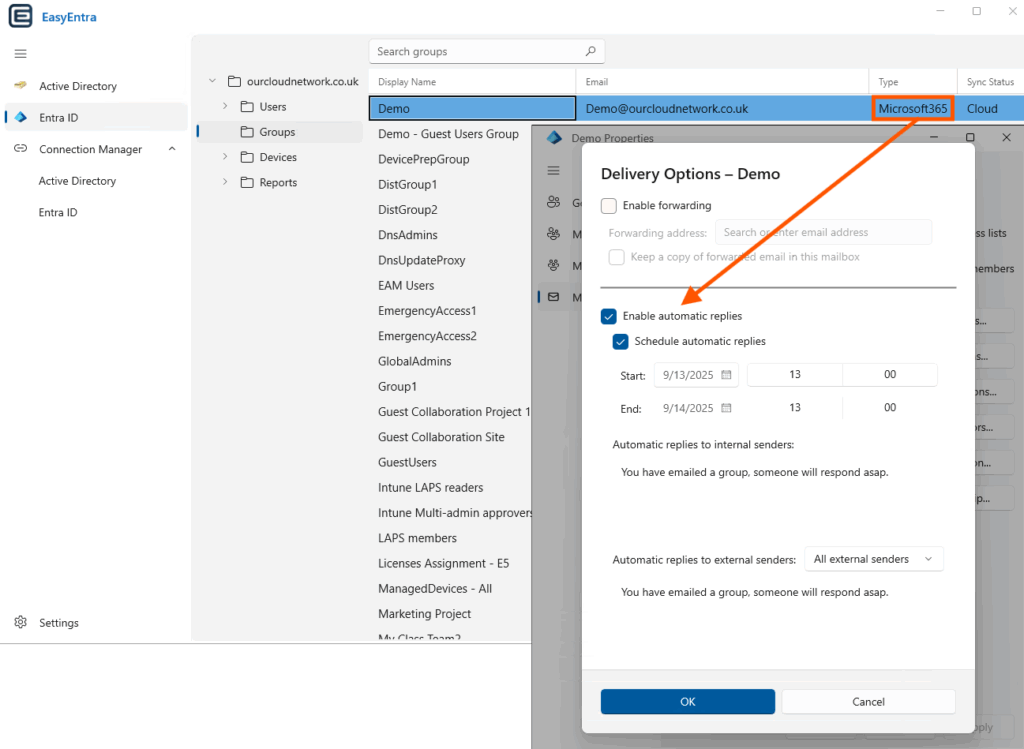
Fundamentally, the product is lightweight and takes just seconds to install. For anyone managing mail users in a hybrid identity environment, it’s a no-brainer to grab the free version here.
A perfect scenario to decommission hybrid Exchange
All your mailboxes are in Exchange Online, and no critical applications rely on Exchange Server for mail relay; that is the perfect scenario. The final blocker has always been simple recipient management. Now, with a user-friendly solution like EasyEntra removing the complexity, that obstacle is gone. Even if you don’t fall into that scenario yet, focusing your efforts on getting there will be a worthwhile investment of resources. This allows you to simplify your infrastructure, shrink your security footprint, and finally say goodbye to on-premises Exchange patching for good.

decommissioning the last Exchange server: https://learn.microsoft.com/en-us/exchange/hybrid-deployment/enable-exchange-attributes-cloud-management .
What are your thoughts on this?