

Microsoft will improve how organisations manage Passkeys in November 2025 when they introduce passkey profiles to Microsoft Entra ID, enabling administrators to configure different passkey policies for specific user groups rather than applying a single blanket policy across their entire tenant.
In this article, I’ll explain how passkey profiles will change the way you manage FIDO2 authentication in your organisation, examine the practical implications of the new group-based policy controls and share recommendations for preparing your environment before Microsoft begins the rollout in mid-October 2025.
The benefits of Passkeys in Microsoft Entra
It’s worth taking a quick step back and understanding why passkeys are important. Let’s do so by examining the Microsoft Authenticator authentication method.
Microsoft Authentication (Traditional MFA) represents the most established approach that organisations employ when requiring MFA. Users receive push notifications on their mobile device, approve or deny authentication requests and need to enter a number displayed on their screen. The problem with this method is that it still requires users to enter a password. It then relies on the user recognising legitimate authentication requests, which sophisticated phishing attacks can exploit.
Microsoft Authenticator Passwordless removes passwords entirely from the authentication process. Users enter their username, then receive a push notification requiring biometric authentication (fingerprint, face recognition, or PIN) directly on their device. This method is stronger security than the traditional MFA method because it requires something the user has (their registered device) and something they are (biometric) or know (PIN), removing the password from the user flow. However, it still relies on push notifications, which can be prone to MFA fatigue attacks where users start to approve notifications without proper verification.
Microsoft Authenticator Passkeys represent the most advanced implementation, utilising the FIDO2/WebAuthn standard. These passkeys are based on the same standard as FIDO2 security keys and provide (in theory) an unphishable passwordless authentication method. When users authenticate with a passkey, cryptographic verification occurs between their device and the service and no shared secrets are transmitted over the network. The authentication request cannot be replayed, redirected, or intercepted by malicious actors (again, in theory).

As you can see, Passkeys offer much stronger protection by cryptographically connecting the device a users owns and must biometrically unlock to their account, requiring it for sign-in. Whereas other more traditional MFA methods still require a level of user verification which could be exploited. Overall, passkeys provide great security advantages, including:
- Enhance phishing resistance
- Elimination of credential replay attacks
- Reduce attack surface
Passkey Profiles
Passkey profiles offer a step forward in how organisations can deploy FIDO2 (or Passkey) authentication across Microsoft Entra. Previously, administrators faced an all-or-nothing approach to defining which Passkeys could or could not be used in their organisation. Any restrictions applied would there-for apply to the whole organisation, which presented a challenge for large organisations across different regions, with different security requirements.
New features to be release later this year in public preview will help solve this challenge, by enabling organisations to create Passkey Profiles, collections of passkeys providers which can be applied to specific groups from the authentication methods policy settings blade in Microsoft Entra.
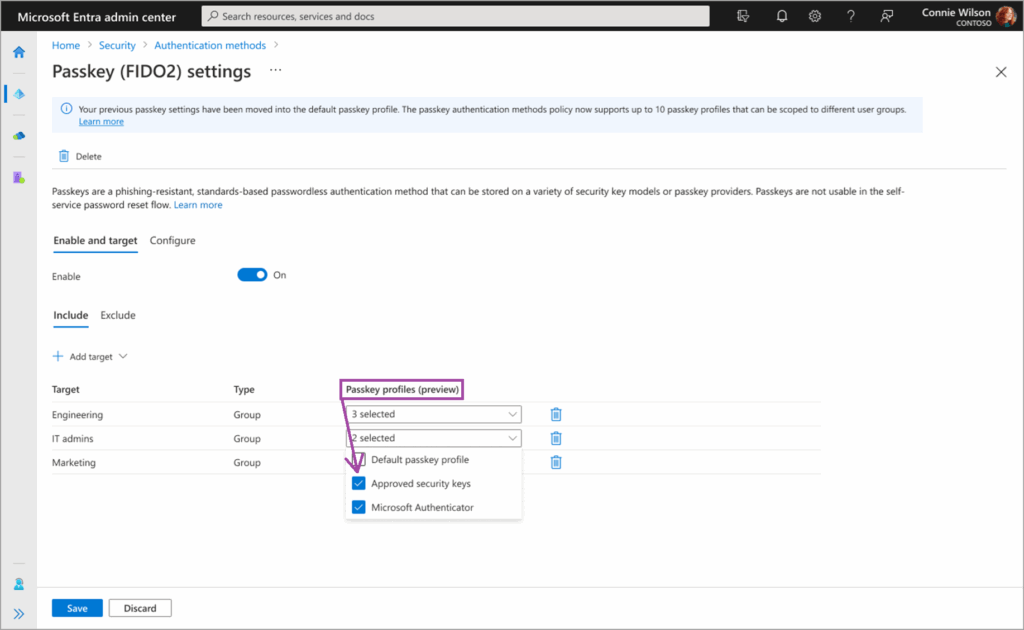
This new level of flexibility will even extended beyond simple user segmentation, allowing organisations to create phased rollout and testing strategies for testing new passkey providers.
Preparing for changes
If you are already implementing Passkey restrictions in your Microsoft Entra tenant today, you should be mindful of this change. Microsoft state the following
This rollout will happen automatically by the specified dates with no admin action required before the rollout. You may want to review your current passkey configuration, notify your admins about this change, and update internal documentation.
However, if you are using the Microsoft Graph API to implement passkey restrictions, Microsoft will not enable your tenant for the public preview in October as the schema changes may impact your usual operations. Instead you will need to wait for General Availability, although no date indication has been provided for that yet.
If you want to prepare for implementing passkey restrictions in your environment, but have been holding off due to the lack of restrictions, which this change will resolve, start by auditing what Passkeys are currently in use in your tenant. Here is a small script you can use to generate a list:
Connect-MgGraph -Scopes UserAuthenticationMethod.Read.All, AuditLog.Read.All

$Report = @()

$PasskeyUsers = Invoke-MgGraphRequest -Method GET `
-Uri "beta/reports/authenticationMethods/userRegistrationDetails?`$filter=methodsRegistered/any(i:i eq 'passKeyDeviceBound') OR methodsRegistered/any(i:i eq 'passKeyDeviceBoundAuthenticator')" `
-OutputType PSObject | Select -expand Value

Foreach ($user in $PasskeyUsers) {
    $passkey = Invoke-MgGraphRequest -Method GET -Uri "beta/users/$($user.id)/authentication/fido2Methods" -OutputType PSObject | Select -Expand Value
    $obj = [PSCustomObject][ordered]@{
        "User" = $user.UserPrincipalName
        "Passkey" = $passkey.displayName
        "Model" = $passkey.model
        "aaGuid" = $passkey.aaGuid
        "Date created" = $passkey.createdDateTime
    }
    $Report += $obj
}

$Report | Out-GridView
#$Report | Export-csv -path C:\temp\UserPasskeyList.csv -NoTypeInformation
You can read the full article here: List All Passkeys and AAGUIDs in Microsoft Entra with PowerShell.
