Directory roles in Microsoft Entra are a collection of permissions which enable you to perform administrative actions within your tenant. Most commonly, they are often instead called Administrator roles. For example, Global Administrator and Intune Administrator are both Administrator roles.
Microsoft has made available a collection of APIs within Microsoft Graph that enable you to read the description of these roles, permissions contained within these roles, manage custom roles and assign roles to users.
If you have already been using Microsoft Graph to manage role assignments and read the properties of your roles, you may already be familiar with the following endpoint:
https://graph.microsoft.com/beta/directoryRoles/
If you haven’t used this endpoint before, you may also be familiar with its Microsoft Graph PowerShell counterpart, which to use, you must at a minimum consent to the RoleManagement.Read.Directory permission in Microsoft Graph.
Get-MgBetaDirectoryRoleIn a recent update to the Microsoft Graph Change Log (found here), Microsoft now recommend that instead of using these existing cmdlets or endpoints, you should use the unifiedRoleDefinition resource type instead:
https://graph.microsoft.com/beta/roleManagement/directory/roleDefinitions/
Its PowerShell counterpart, being somewhat fruitlessly generated by Microsoft’s auto-rest process, can be used with the following cmdlet and the same permissions as the previous cmdlet.
Get-MgBetaRoleManagementDirectoryRoleDefinitionAt a glance, there are some immediate improvements of this endpoint to the last. The main one is the amount of information that can be derived from an administrator role.
Lets compare the difference by looking into the information we can gather about the Intune Administrator role.
Using the directoryRoles endpoint
GET https://graph.microsoft.com/beta/directoryRoles/0940ce75-3ec0-420c-914c-a5801ccda32

{
   "@odata.context": "https://graph.microsoft.com/beta/$metadata#directoryRoles/$entity",
   "@microsoft.graph.tips": "Use $select to choose only the properties your app needs, as this can lead to performance improvements. For example: GET directoryRoles('<guid>')?$select=description,displayName",
   "id": "0940ce75-3ec0-420c-914c-a5801ccda325",
   "deletedDateTime": null,
   "description": "Can manage all aspects of the Intune product.",
   "displayName": "Intune Administrator",
   "roleTemplateId": "3a2c62db-5318-420d-8d74-23affee5d9d5"
}
Using the unifiedRoleDefinition endpoint
GET https://graph.microsoft.com/beta/roleManagement/directory/roleDefinitions/3a2c62db-5318-420d-8d74-23affee5d9d5

{
"@odata.context": "https://graph.microsoft.com/beta/$metadata#roleManagement/directory/roleDefinitions/$entity",
"@microsoft.graph.tips": "Use $select to choose only the properties your app needs, as this can lead to performance improvements. For example: GET roleManagement/directory/roleDefinitions('<guid>')?$select=allowedPrincipalTypes,assignmentMode",
"id": "3a2c62db-5318-420d-8d74-23affee5d9d5",
"assignmentMode": "allowed",
"categories": "devices,identity",
"description": "Can manage all aspects of the Intune product.",
"displayName": "Intune Administrator",
"isBuiltIn": true,
"isEnabled": true,
"isPrivileged": true,
"resourceScopes": [
   "/"
],
"richDescription": "Users with this role have global permissions within Microsoft Intune Online, when the service is present. Additionally, this role contains the ability to manage users and devices in order to associate policy, as well as create and manage groups.",
"templateId": "3a2c62db-5318-420d-8d74-23affee5d9d5",
"version": "1",
"rolePermissions": [
   {
      "allowedResourceActions": [
         "microsoft.azure.supportTickets/allEntities/allTasks",
         "microsoft.cloudPC/allEntities/allProperties/allTasks",
         "microsoft.directory/bitlockerKeys/key/read",
         "microsoft.directory/contacts/basic/update",
         "microsoft.directory/contacts/create",
         "microsoft.directory/contacts/delete",
         "microsoft.directory/deletedItems.devices/delete",
         "microsoft.directory/deletedItems.devices/restore",
         "microsoft.directory/deviceLocalCredentials/password/read",
         "microsoft.directory/deviceManagementPolicies/standard/read",
         "microsoft.directory/deviceRegistrationPolicy/standard/read",
         "microsoft.directory/devices/basic/update",
         "microsoft.directory/devices/create",
         "microsoft.directory/devices/delete",
         "microsoft.directory/devices/disable",
         "microsoft.directory/devices/enable",
         "microsoft.directory/devices/extensionAttributeSet1/update",
         "microsoft.directory/devices/extensionAttributeSet2/update",
         "microsoft.directory/devices/extensionAttributeSet3/update",
         "microsoft.directory/devices/registeredOwners/update",
         "microsoft.directory/devices/registeredUsers/update",
         "microsoft.directory/groups/hiddenMembers/read",
         "microsoft.directory/groups.security/basic/update",
         "microsoft.directory/groups.security/classification/update",
         "microsoft.directory/groups.security/create",
         "microsoft.directory/groups.security/delete",
         "microsoft.directory/groups.security/dynamicMembershipRule/update",
         "microsoft.directory/groups.security/members/update",
         "microsoft.directory/groups.security/owners/update",
         "microsoft.directory/groups.security/visibility/update",
         "microsoft.directory/users/basic/update",
         "microsoft.directory/users/manager/update",
         "microsoft.directory/users/photo/update",
         "microsoft.intune/allEntities/allTasks",
         "microsoft.office365.organizationalMessages/allEntities/allProperties/read",
         "microsoft.office365.supportTickets/allEntities/allTasks",
         "microsoft.office365.webPortal/allEntities/standard/read"
      ],
      "condition": null
   }
],
"[email protected]": "https://graph.microsoft.com/beta/$metadata#roleManagement/directory/roleDefinitions('3a2c62db-5318-420d-8d74-23affee5d9d5')/inheritsPermissionsFrom",
"inheritsPermissionsFrom": [
      {
         "id": "88d8e3e3-8f55-4a1e-953a-9b9898b8876b"
      }
   ]
}
As you can see, there is a good reason for Microsoft’s recommendation. The unifiedRoleDefinition endpoint provides a lot of useful and practical information compared to the directoryRole endpoint. Importantly, it reveals the underlying allowedResourceActions contained within each role.
Here is an example taken from a post to the r/entra subreddit which I moderate. The user was expecting to be able to read cross-tenant access settings in the Entra admin center using the Security Reader role.
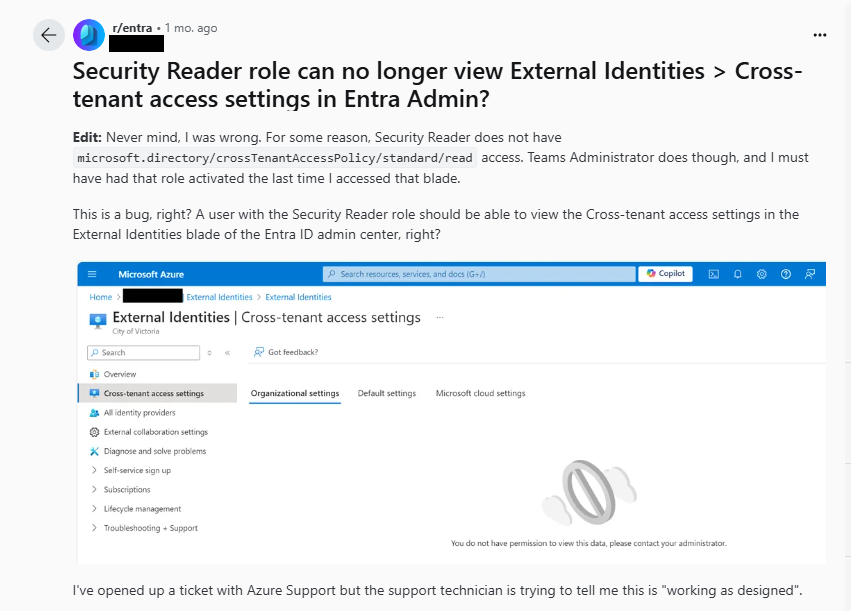
A quick check with PowerShell highlights the missing permission on the role:

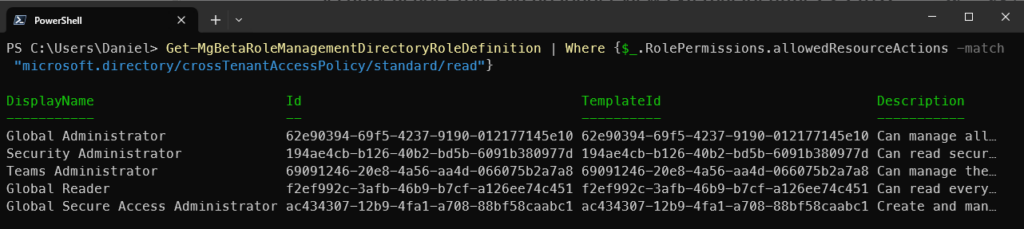
Alternatively, you can locally filter for roles which contain the permission you need:
Get-MgBetaRoleManagementDirectoryRoleDefinition | Where {$_.RolePermissions.allowedResourceActions -match "microsoft.directory/crossTenantAccessPolicy/standard/read"}As you can see from the below, there are 5 built-in Microsoft Entra roles which contain the ability to view cross-tenant access settings in Microsoft Entra.